


Kako Live -Live Stream & Party
3.940.00 Reviews
App Specs
- Version
- 2.8.2
- Updated On
- License
- Free
- Downloads
- 1,000,000+
- Developer
- Rainbow Bridge Art
- Categories
- Social
- Platform
- Android
Screenshots
 Analysis by AppCompare
I judge a social app less by how many things it promises than by whether its main activity gives people a reason to return. Kako Live puts live, real-time interaction at the center: you can watch a broadcast, respond while it is happening, or take a turn hosting one yourself. That focus makes it feel more immediate than a feed built around posts people may see hours later. It also means the experience depends heavily on whether you enjoy being present with a crowd, rather than browsing quietly on your own.
Live interaction is the point
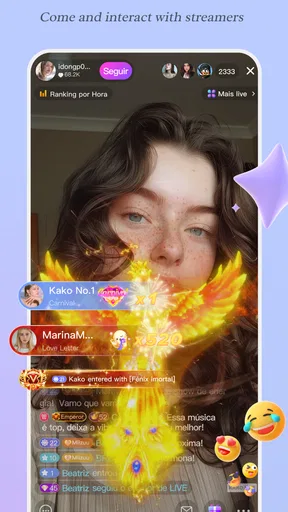
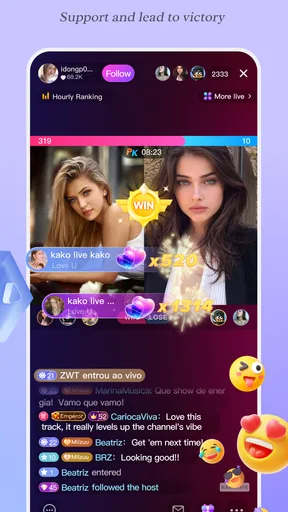
What appeals to me about live socializing is the shared timing. A comment sent during a stream belongs to that moment; it can become part of a conversation instead of disappearing into a long queue of reactions. Kako Live’s mix of streams, comments, live chats, and virtual gifts gives viewers several ways to take part. You do not have to be the person on camera to feel involved, though viewers who prefer to observe without interacting may get less out of the format.
That distinction is useful when deciding whether to try it. A conventional social network is often better for catching up at your own pace, while a group-messaging app is better when you need a private, practical conversation. A live-centered app suits a different mood: dropping into something happening now, reacting as it unfolds, and perhaps meeting people around a shared interest. I would choose Kako Live for that social immediacy, not as a replacement for every other way I keep in touch.
What joining a stream feels like
In practice, I would treat a stream like a room I am entering partway through. I would first spend a little time watching and reading the comments, then decide whether to say something. That small pause is a handy way to gauge the tone before joining in. If the conversation feels welcoming, a short, relevant comment is usually a more natural opening than trying to dominate the chat. Virtual gifts add another form of participation, but they are optional in spirit; I would not treat spending as the price of being part of a community.
For a first visit, it helps to set a modest goal: find a stream that matches an interest, watch long enough to understand its pace, and leave if it is not for you. Live spaces can be lively, but they can also move quickly, and a viewer may not get a reply. I would not read silence as a personal rejection; the host may simply be focused on the broadcast or responding to someone else. This is one of the trade-offs of a shared live conversation compared with a one-to-one message.
Hosting takes a different kind of confidence
Creating a stream changes the experience from casual browsing to being responsible for the room. A simple topic helps: a short chat about something you enjoy is easier to sustain than going live with no idea what to say. I would also think about the setting before starting, including what can be seen or heard around me. Filters and effects can add a bit of polish, but they cannot replace a clear idea or make an awkward conversation flow by themselves.
For someone trying live video for the first time, a low-pressure approach is best. Start with a narrow subject, keep expectations realistic, and treat the first broadcast as practice rather than a performance that needs to attract a crowd. If the idea of being watched feels stressful, there is no need to host; viewing and commenting are valid ways to use a social platform. That flexibility is a real advantage for people who want to participate without turning themselves into regular creators.
Worth Reading Before You Choose

EA SPORTS FC Mobile 26 Is a Bigger Football Game, but It Takes Time

Flipboard Shows What News Apps Must Do Beyond the Feed

Switching to Android Auto Means Rethinking Your Driving Routine

Google Calendar Makes a Crowded Week Easier to Manage

Ludo King Makes the Most of the Minutes Between Plans

Baby Panda World Brings Quick Play to Modern Phones, but Its Game Library Feels Busy
A practical way to fit it into the day
Imagine having a short break in the evening and wanting company without arranging a call with friends. I might open Kako Live, look for a conversation connected to an interest, and watch while I have time. If it holds my attention, I can contribute a comment; if dinner or another task interrupts, I can leave without the coordination a scheduled call requires. This kind of informal drop-in use is where live socializing can work well: it offers a sense of presence without asking everyone to be available at the same time by arrangement.
It is less suitable when I need a dependable, focused exchange. A stream is not the place I would choose for confidential details, urgent help, or a conversation that must stay organized. For those needs, a direct communication tool is usually the clearer choice. I would also keep a boundary around viewing time: live feeds can encourage one more stop, so choosing a rough time to leave makes the app easier to enjoy without letting casual browsing take over the evening.
Getting Started with Kako Live
Kako Live is a free social app from Rainbow Bridge Art, released on August 1, 2024. It has a 3.8 average from around 5,000 ratings and more than 1 million installs, which suggests that it has found a sizeable audience while leaving room for mixed experiences. The current version is 2.1.5, and it requires Android 6.0 or later. Its Teen age rating is worth keeping in mind for families: I would look at the app together with a younger user and discuss public interaction and spending before they start using it independently.
Finding your footing without rushing
First things first, downloading it is a breeze. The installation is quick, and setting up an account is as simple as pie. You can sign up using your email, phone number, or just link it to your existing social media accounts. I opted for the social media login because, hey, who wants to remember another password?
Even if registration is straightforward, I would not rush past the choices that shape how I show up socially. Before joining conversations, I would check what information is visible on my profile and take a moment to understand the available audience controls. Those are useful habits on any social platform, but they matter especially when the core activity is live and responses arrive in the moment. If you are helping a teenager get started, making these checks together is more practical than assuming a private-feeling conversation is automatically private.
The User Interface
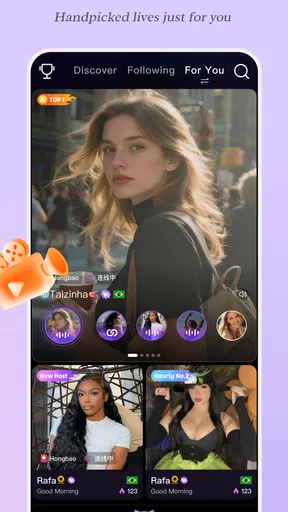
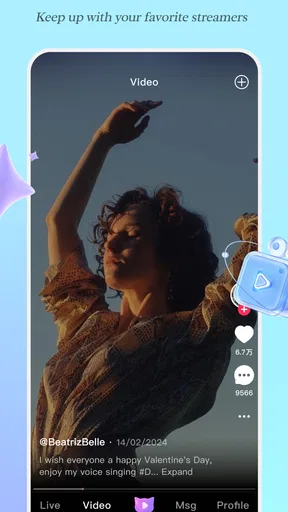
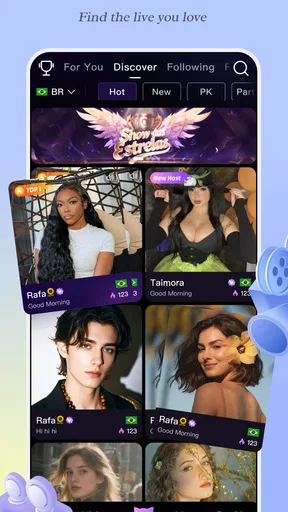
Once you’re in, you’re greeted with a vibrant and intuitive interface. The design is sleek, with everything laid out just where you’d expect it. There’s a menu at the bottom that lets you navigate between live streams, your profile, and other nifty features. I found the app’s layout to be very user-friendly, even for a first-timer. If you’ve used any social media app before, you’ll feel right at home here.
That familiar navigation is helpful, but it also makes it easy to move from browsing to interacting before you have decided what you want from the session. I would make the first visit exploratory: notice how streams are presented, find the profile area, and learn where the audience controls sit before starting a broadcast. A little orientation pays off later because live interaction leaves less time to pause and search for a setting once a conversation is already moving.
Features that Stand Out
Now, let’s talk about the features! It isn’t just about watching live streams – it’s about interaction. You can engage with streamers in real-time through comments, virtual gifts, and even live chats. It’s like being at a concert where you can actually talk to the performers. Pretty cool, right?
One sensible way to approach those options is to separate conversation from support. A comment is enough when I want to join the discussion; a gift is a different gesture and may involve spending. In-app purchases range from $0.49 to $199.99 per item, so I would check the amount shown at the point of purchase and set a personal limit before using paid items. The broad range makes that small pause worthwhile, particularly if a fast-moving stream creates pressure to respond in the moment. Being able to participate without buying anything is important to me.
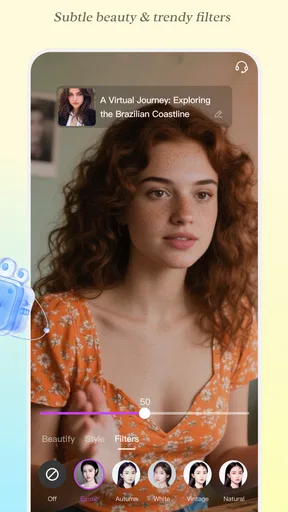
Another feature I found intriguing is the ability to create your own live streams. Whether you’re a budding musician, a gamer, or just want to chat with friends, this app gives you the platform to showcase your talents. Plus, the built-in filters and effects make your streams look pretty professional.
For a smoother first broadcast, I would prepare one opening question or a couple of points to talk about rather than relying on effects to carry the session. That gives viewers something concrete to respond to and helps avoid long pauses. I would also test the framing and background before going live, since a filter can change the look of a video but cannot hide every detail that might identify a location or reveal something personal. These are simple steps, yet they make hosting feel more deliberate and less stressful.
Community and Interaction
The sense of community on Kako Live is something I genuinely appreciated. The app encourages interaction, and you can join groups based on your interests. Whether you’re into cooking, gaming, or just want to chat about the latest movies, there’s a group for you. It feels like a close-knit community, and the engagement level is high, which makes the experience more rewarding.
Shared interests are a better starting point than expecting an immediate friendship. I would return to a topic because I enjoy it, not because I expect every group or stream to feel close-knit right away. Community quality can vary from one conversation to another, and the live format gives each host and audience its own rhythm. If a space feels uncomfortable, moving on is a reasonable choice; finding a better fit matters more than trying to make every room work.
Privacy and Security
In today’s digital age, privacy is a biggie. You have control over who sees your live streams and who can interact with you. There are settings to keep your profile private or public, depending on your comfort level. I felt secure knowing that my data and interactions were well-protected.
I would still use audience controls thoughtfully rather than assuming a setting removes every risk of live sharing. Before streaming, check who can see the broadcast and interact, and avoid showing personal documents, addresses, or other sensitive details in the background. Viewers should also remember that live comments are social interactions, not a substitute for a private channel. For anyone who wants a tightly controlled, invitation-only conversation, a dedicated private call or group chat may be a better fit.
Who will get the most from it
The best match is someone who enjoys spontaneous conversation and is comfortable dipping into social spaces without expecting every visit to produce a lasting connection. It may also suit a creator who wants a casual place to try live broadcasts, especially when the goal is to talk with viewers rather than publish polished, edited videos. People who prefer asynchronous posts, quiet browsing, or strictly private communication may find a conventional social feed or messaging app more dependable for their needs.
For families, the Teen rating is a prompt to talk through how the app will be used, not a reason to skip basic supervision. I would agree on sensible boundaries around live interaction, personal details, and optional purchases before a young person begins. On an Android device, the minimum requirement is version 6.0, and the app is free to install; paid in-app items are a separate consideration. That distinction makes it easier to try the social experience without treating purchases as necessary, while still keeping spending in view.
Overall Experience
Using it has been a refreshing experience. It combines the excitement of live streaming with the warmth of community interaction. The app is easy to navigate, and the features are designed to enhance user engagement. Whether you’re a content creator or someone who just likes watching streams, there’s something here for everyone.
My recommendation comes with a clear condition: enjoy it for the live moments, but choose it with realistic expectations. It is at its best when I want to watch, respond, or host around a shared interest; it is not my first choice for private plans, polished long-form content, or a conversation that cannot tolerate interruptions. That difference is more useful than treating one social app as a universal hub. A rating of 3.8 reflects a mixed overall impression, so I would try it for the interaction style rather than assuming it will suit every viewer.
So, if you’re looking to spice up your social interaction game, give it a shot. It’s not just an app; it’s a whole new way to connect and share experiences. Dive in, and you might just discover a new favorite pastime.
Pros
- User-friendly interface for easy navigation.
- High-quality video streaming capabilities.
- Interactive chat features with real-time updates.
- Diverse range of live content to explore.
- Secure login and privacy options.
Cons
- Occasional buffering on slower networks.
- Requires high data usage for streaming.
- Limited parental controls for younger users.
- Some features locked behind in-app purchases.
- Notifications can become overwhelming.
FAQs for Kako Live -Live Stream & Party
What is Kako Live and what features does it offer?
Kako Live is a dynamic live streaming app that allows users to broadcast and interact with audiences in real-time. It offers features like virtual gifting, live chat, and video filters to enhance the streaming experience. Users can also follow their favorite broadcasters and participate in live events and challenges.
Is Kako Live available for both Android and iOS devices?
Yes, Kako Live is available for download on both Android and iOS platforms. You can find it on the Google Play Store for Android devices and the Apple App Store for iOS devices, ensuring a wide range of compatibility across different smartphones and tablets.
Are there any in-app purchases or subscription fees in Kako Live?
Kako Live offers a freemium model, where the app is free to download and use, but it includes in-app purchases. Users can buy virtual gifts and premium features to enhance their streaming experience or support their favorite broadcasters. Subscription plans may also be available for additional benefits.
Is Kako Live safe for all age groups to use?
Kako Live is designed for users aged 13 and above, with content moderation in place to ensure a safe environment. However, as with any live streaming app, parental guidance is recommended for younger users to monitor interactions and content viewed on the platform.
How can I start my own live stream on Kako Live?
To start streaming on Kako Live, you need to create an account, set up your profile, and allow the app to access your camera and microphone. Once you're ready, tap the 'Go Live' button, choose your streaming category, and begin broadcasting to your audience. Engage with viewers through chat and enjoy real-time interactions.


